
On October 2, 2010, my hipster friend Lisa asked me to join an exclusive invitation-only website called Pinterest. Her exact words were, “This is a website I think most of us could fall in love with.”
Lisa needs to get herself a crystal ball and change her name to Miss Cleo, because truer words have never been spoken. This was back in the day when Pinterest only gave you 10 invitations for your friends. I’m proud to say that I was one of the original pinners on that old beta version.
Instantly I was sucked into Pinterest, where columns and rows of pin boards updated regularly to reveal amazing photos of recipes and organizing tips and home interiors and gardens. I became a pinning zealot, staying up late at night to scour other pinner’s boards and find beautiful pictures to repin. I absolutely loved it.
Five years and 100,000 followers later, I still adore Pinterest. But my reasons for loving it have changed. I now love it not only for the unending stream of ideas it produces, but also for the referral traffic it sends to my little blog. As a blogger, Pinterest has been a complete game-changer for me. I wrote a lot of tips about my experience with the power of Pinterest, but today I want to give even more specific advice on how to get your blog entries to go viral on Pinterest.
First, let me explain some background history just in case you aren’t a regular reader here. When I look back through my blog stats since 2009, there is a clear shift in my traffic beginning in November of 2011, and I give all the credit to Pinterest.

A full year earlier in December of 2010 I had written a short entry with instructions on how to take glowing pics of the Christmas tree that I learned from Click Workshops. That post sat on my blog for a nearly a full year with just three comments on it from personal friends and no other activity. Considering I only had about five readers back then, this wasn’t a big deal. But then one night while perusing my sitemeter stats I discovered that there had been thousands of page views to my small personal blog in just a few hours. Suddenly, all these comments started rolling in for this year-old blog entry. I was stunned. It didn’t make much sense until I was able to pinpoint the referring URLs that brought such an enormous wave of traffic. Em from A Bunch of Scrap and Stacy at KidStuffWorld had pinned and repinned the picture of my son in front of the Christmas tree with a description of “How to take Glowing Pics of the Tree”.
And just like that– within the span of a few short hours– the image of my little boy standing in front of our bright Christmas tree went viral on Pinterest. Those two ladies unknowingly gave my blog the biggest boost of it’s career.

For weeks the image blasted across Pinterest like that sheep on the Sheep Launcher game on my iPhone. Just when it would begin to lose momentum and fall back down to earth another popular blogger would repin it and shoot it back out into the universe like a woolly little pin-ball in aviator goggles. Every time my blog stats spiked I imagined a sheep pin-ball bouncing around and racking up thousands of points along the way. Is it weird that I just admitted that out loud? This is how my brain works, people.
Since that first viral post, my blog traffic has grown steadily but significantly, and I’ve come to rely on Pinterest as the main source of traffic generation for my blog. And I’m not the only one. According to this recent article from TechCrunch, Pinterest sends out more referrals than Twitter, StumbleUpon, Bing, and non-organic Google all combined in the great referral race. If you are in the food, DIY, craft, interior design, fashion or any other girly blogging niche, Pinterest referrals should be your analytics bread and butter by this point. If you are in one of these niches and haven’t seen a significant boost in your traffic from Pinterest, then keep reading.
This post is for you.
On day my friend Rachel at Grasping for Objectivity emailed me to ask what all the Pinterest fuss was about. She wanted my advice on how to make her posts more pin-worthy in an effort to drive more traffic to her blog. Rachel is a super-witty mommy blogger who I like to call the Queen of Jeans. She has been posting hilarious entries about how women should avoid the dreaded long-butt in mom jeans for years. But as a mommy blogger, she was struggling a bit with how to make her posts more pin-worthy. She was also interested in the “geekery underworkings of new social media”, to use her words. After we exchanged some emails she put her backfield in motion and made a few small changes to the way she presented her blog entries and photos.
Here is the advice I gave Rachel on how to make a post go viral on Pinterest, along with a few other Pinterest etiquette tips I’ve picked up along the way:
First and foremost, make sure your blog images are able to be pinned! If you use flickr for your blog photos, your pics might not be able to be pinned. If your images are showing up saying “Sorry You cannot pin this image” then you need to read this post on how to make your images pinnable again.
Write pinnable and viral worthy content. Duh…. pretty obvious, but it needs to be said. Your post needs to tell people how to do something faster, better, cheaper or easier than they’ve ever heard before. Or it needs to stand out as something unique that grabs a pinner’s attention and holds it long enough to get them to click through to your site. If you’re lucky, they will like what they see and stick around for a while.
Create a pinnable graphic image. Whether it’s a “How To” DIY post or just a beautiful picture that showcases your talents, make sure every post on your blog has an attention grabbing and eye-catching pinnable image. This board features good examples of pinnable graphics.
Write a catchy headline for your images. Think of pinnable images as tiny magazine covers. You’ve got one shot to grab attention, so make it count. A straightforward description on your photo lets the pinner know exactly what they are getting themselves into if they click on that pin. This can be an excellent way to get the “pin now, read later” crowd.
But on the other hand…
Don’t ALWAYS cover up great photography with text. Sometimes a pin needs no introduction because the image is beautiful enough to speak for itself. Just let the caption do the talking and keep the image free of clutter. “Pinterestizing” photos by placing text labels on them is so common now that sometimes it’s refreshing to pin pretty word-free images that don’t smack of an advertising campaign. Also it’s sexier not to reveal too much up front, right? Keep the mystery alive and all that.
Create and join collaborative boards that are relevant to your audience. If you want a more social experience and a way to gain more exposure for your pins, team up with other bloggers or pinners in your niche to create a few specialized collaborative boards.
Be very descriptive.. I always try to have good etiquette and type out a detailed description of exactly what I’m pinning onto collaborative boards instead of a just posting randomness like “cool site!” or “heck yes!”. If you are descriptive, this allows the pin to be more searchable, which results in more repins. I also try to mention the original source in my comments since it’s just nice manners to give credit to someone for their work. Now, I’ll admit that I don’t edit every single repin with a full description, but if I pin something original for the first time, I usually try to get a fair amount of info in there.
Play nice. Don’t steal blogger’s pretty images and link them back to your own site. Just don’t. It’s despicable and not cool.
Get social on Pinterest. Or don’t. Your choice.  There are long conversations, discussions and debates happening in many of the comments on some folks boards, which is what really makes Pinterest an interactive social networking site. I enjoy the social aspect to an extent, but I will admit that a lot of days I just want to retreat to my happy place and pin in silence inside my pin boards. There is no right or wrong way to use Pinterest for social networking, just please remember to be kind in your comments. Keep in mind that the original poster has access to all pins back to their site, which means they can and will read your comments about their projects. If you wouldn’t say it to someone’s face, then don’t post it in a comment section. It’s just good comment karma, in my opinion.
If you are wondering how you can see what people have pinned from your blog, simply enter this in your browser: http://pinterest.com/source/insertyourdomainhere.com and replace the “insertyourdomainhere.com” with your website’s domain name. This should take you to a page of pins that people have pinned off of your blog. Prepare to become a stalker of this page. If you’re a dedicated blogger it’s a great barometer to see your most popular posts and what people love from your site.
Don’t post The Ugly. Another great pinner who gets a ton of pin comments is Michael from Inspired by Charm. At the time of this article has over 3 MILLION followers (and quickly multiplying) on Pinterest. Isn’t that awesome?! Michael says he has no idea how he got so popular, but I have no doubt it’s because he pins only the most beautiful and inspiring things he finds. Plus he has really good taste. In my experience, most people like for their pin boards to be chock full of beautiful, magazine worthy pictures. There are exceptions to this, sure, but overall, if you want to see your blog posts get more attention you need to be posting pretty stuff because that’s what people like to pin.
Be cautious about pinning for money. This has nothing to do with going viral, but everything to do with your reputation as a pinner. This is my own personal opinion on this matter, and those of you who are allegedly making millions off your pins will laugh in my face to read this, but please don’t pin a ton of stuff just to get paid for them. I’ve been approached by a number of companies offering to pay me for pinning their products to my boards. Aside from the fact that it is kind of shady, I don’t want to lose credibility with my followers because I’m spamming up their pinterest feeds with products that I may or may not like just for a paycheck. I also know that it would be glaringly obvious if I started pinning products like a madwoman when my past pins are not product centric at all. Pinterest is my little happy place. I don’t want to spam that up. Now, if I got paid to pin pics of pretty houses or gardens, then…. maybe. LOL
Put a “Pin It” button at the top and the bottom of your blog entries. With plug-ins these days this is as easy as a Google Search. Back in the olden days we had to hard code it in there or do it by hand every time. Oh how easy you new bloggers have it… But seriously, there is a book out about common sense website development practices called Don’t Make Me Think by Steve Krug. It basically says don’t make your readers work for anything. Make your site as obvious and intuitive as possible. Putting a Pin It button right at hand just makes sense if you are hoping to go viral.
Give your pinnable images a very descriptive title. This is yet another way to make life easy for your readers that takes about .002 seconds of your time. Here is what my code looks like for the image at the top of this post:
title=”How to go viral on pinterest- tips for making your blog traffic skyrocket from Pinterest referrals by Unskinny Boppy” src=”https://bethbryan.com/wp-content/uploads/2012/08/how-to-go-viral-on-pinterest_thumb.jpg” alt=”how to go viral on pinterest” width=”504″ height=”504″ />
Note the title= wording in bold. If you hit “Pin It” on this post and choose that first image, the descriptive title will automatically get popped into the comment section of the pinterest box so your readers don’t have to do any work. They can edit if they choose, but it’s already filled in for them if they are lazy like me.
So there you have it. That is the gist of what I told Rachel about how to use Pinterest to it’s full advantage. Some are painfully obvious, but if you follow these guidelines you might see some unexpected success. In Rachel’s case, she took all of that advice and ran with it.
And I’m very happy to report that Rachel’s butt went viral while she was attending BlogHer in NYC. Her post about The Gap selling gateway mom-jeans got pinned and repinned by a few popular bloggers, and BOOM. Rachel’s rear end became an overnight Pinterest sensation. She got so much traffic from Pinterest that her host’s server crashed, then her backup server crashed, then much panic ensued, all while she was trying to enjoy the BlogHer conference. She finally got things sorted out with her host, but only after enduring the whole site-crashing viral pandemonium ordeal because of a few pins by a few people who were pleased by her posterior-posing posts. She just might have the most famous fanny on pinterest at the rate she’s going.
Here are some of the ways Rachel took her site to a new level with Pinterest after creating some home grown analytics (Note: This was written back before Pinterest offered actual analytics… but the message still applies.)
1. The Pin First, Read Later pins
2. The Read First, Pin Later pins
Of course there are many other types of pins out there, such as the Pin Now, Read Never pins– These are the pretty pictures of far away lands that I will never visit, or the fields of lavender that I will never smell, or the inspiration quote that makes me get misty eyed, or the hilariously obscene one-liner e-cards that crack me up. These are the pins that don’t entice me to click since it gives me everything I need right up front. The picture just makes me happy or the joke makes me laugh, so I pin it on a whim with no intention of ever going to the website to see more. These particular pins might result in a ton of repins, and I’m sure they do drive some traffic to the sites, but I don’t think that they are the type of pins that will get a consistent influx of traffic to your blog.
According to Rachel’s (admittedly highly unscientific) findings, if you’re going for a case of the virals, you should try to write the Read First, Pin Later type posts. In other words, make your pin so juicy that all those bored women perusing Pinterest just can’t resist clicking it.
If you want to achieve a slow but steady stream of traffic, you should try to create a Pin First, Read Later type post. These are the tips that we might want to save for later when we really need them. There are advantages to both types, and in my opinion, you should aim to create a mixture of both types on your blog.
Another interesting thing to note from her findings is that one of her posts that has had nearly 30,000 pins was actually written in 2009, long before Pinterest ever became popular. Just like my Christmas tree post, her long-archived blog entry was rejuvenated by Pinterest popularity. In Rachel’s words, “all I did was make a pretty graphic, and bam – it went nuts.”
So, if you are an established blogger with years of blog entries under your belt, you might want to spend a little time dusting off the old archives and “pinterestizing” the graphics in a few of the better posts that got little attention. Ask a few friends to pin the new graphic for you just to get the ball rolling, and then see what happens. If the post content or the picture is eye-catching enough, you might stumble upon a little treasure trove of traffic that might not have ever found you otherwise. AND you don’t have to spend time writing a new entry to get it. Because let’s face it, blogging is time consuming work. I’m all about cutting some corners and using what you have to save effort.
Speaking of graphics, let’s back up just a second and add a few more tips to the list….
A Picture is Worth a Thousand Pins. As I mentioned in the list above, an eye-catching pinnable photograph is the first basic step for a viral post. You’ve got to make your blog image to stand out in the sea of overwhelmingness that is a Pinterest feed. Also, you’ve got to make it easy for your readers to pin. If you haven’t noticed, most bloggers are putting their most pinnable image right up at the top of the post where it’s front and center and blatantly obvious. Both Layla from The Lettered Cottage and Heather from At The Picket Fence shared this great tip at the Haven Conference, and I want to share it here. Think about what pictures you want to be your most pinnable from the very beginning of your project. Consider it when you are staging and snapping your blog photos. Along with the other pictures you take of your project/ room/ recipe, take a few pictures that are off centered, so that there is blank space over to one side where you can add text for a title just as a magazine cover would. When you are editing your pictures, take one of the off-centered pictures, slap a bold title on it and make it 100% clear what the pinner can expect to see on the other side of the click-through.
This is a great way to generate the Pin Now, Read Later type of pin.
One of the most in-you-face examples that I’ve seen of using a Pinterestized picture to make a blog post go viral is this “How I Organized my Entire Life” post from Modern Parents Messy Kids.
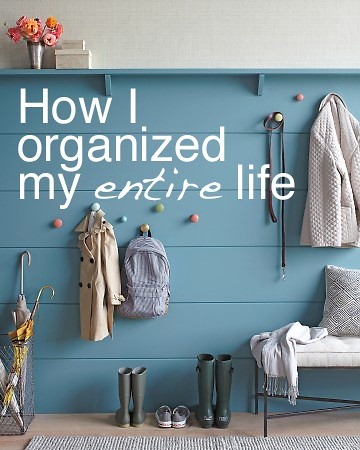
Photo via Modern Parents Messy Kids
Have you seen this one?
It’s very clever, even if it’s a bit sneaky. The author took a pic from Martha Stewart Living, added some catchy text in a readable font, and inserted it into a blog entry about all the things she WANTED to do to organize her entire life. About halfway through the post she says “And then I woke up. DAMN. IT. ” I laughed so much when I read this post, because it was the perfect bait and switch Pinterest marketing ploy. She’s had 245 comments and thousands of repins from that one image. Somebody give this lady a standing ovation. Well played, my friend.
Another Pin Now, Read Later post that has been an huge source of Pinterest driven traffic for me is The Lazy Girl’s Guide to Painting Wall Stripes.

I haven’t had any overwhelming surges of traffic from this like I have with the Christmas tree post, but instead I’ve seen more of a steady but consistent stream of traffic trickling through from it. This is the ideal way to go viral, in my opinion, since major traffic surges will send a self-hosted blog into a 404 tail-spin of server crashes if your host can’t handle the load. Talk about stressful! That is something we’d all like to avoid even though it’s a good problem to have. That is exactly why I put a nice easily pinnable image right up at the top of this post in the hopes that it will become a Pin Now, Read Later post for some people. Plus. a nice steady stream of traffic over many months is what allows me to let my blog coast for a few weeks without posting. I still have traffic and page views coming in to older posts, sometimes even more than I do with new posts. Everyone must have Christmas in July fever, because my Christmas tree post has skyrockted again in the past month, sending tons of traffic to my blog. I KNOW that my posts have gone really viral again when two of my in-real-life friends in different parts of the county send me facebook messages saying that they had just seen Garrett’s picture pop up in their Pinterest feeds and gush about how famous I am. LOL! I don’t feel famous in any way, shape or form, but Garrett’s backside sure is!
Come to think of it, maybe my son has the most famous fanny on Pinterest! Sorry, Rachel. hehehe.
Brainstorm ways to write creative content that will get you to the top of the stack. Need help brainstorming? Here you go… People on Pinterest (read: middle aged home-owning women) love “how to” posts with easy ideas showing them how they can do things themselves.
Appeal to all the inner Virgos of the world by demonstrating how to organize home or closets. Show them a shortcut to create their favorite recipe in less than 30 minutes. Women love shopping. And fashion. They love pretty new free font ideas. Women love decorating their houses and looking inside other people’s houses. Women love planning weddings and feathering their imaginary or real baby nursery nests. They love shoes and handbags and jeans that make their butts look good. And pretty updos that don’t take all morning to create. Women are vain. Women love to pin exercise and workout ideas. (No comment on the follow-through.) Women love Christmas, Halloween, Fall and Easter decorations. Imagine how much traffic all those elf on a shelf list ideas have gotten and will continue to get! Women love fun or educational ideas for their kids. Women love ideas on what to feed their toddlers and pack in their kids lunches. They love photography tips. They love ideas on how to use their essential oils. If you need proof of that, check this out… I slipped this pretty little graphic into my “How to Buy Essential Oils” page and got 20,000+ repins in the first month! No joke.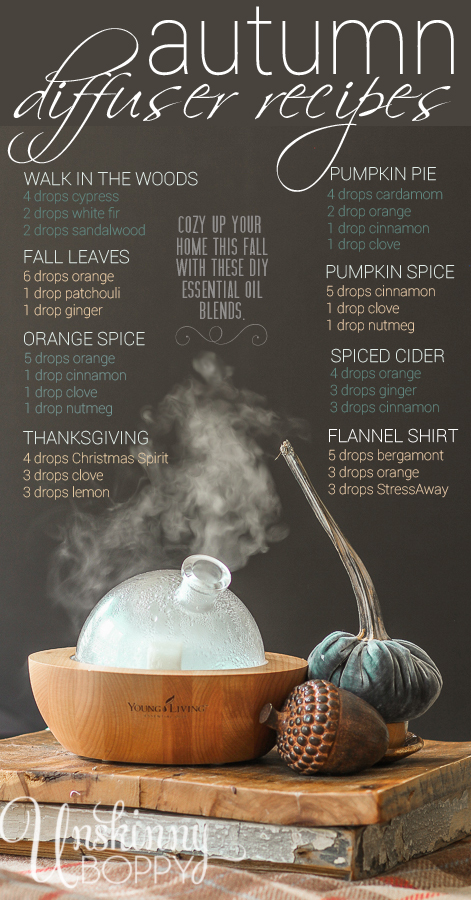 .
.
There are MILLIONS of blog ideas that could go viral at any moment. I encourage every blogger out there to climb aboard this Pinterest wave and ride it to the end, then figure out what the next wave will be.
Ultimately, there is no exact magic formula that will make your posts go viral on the internet, but hopefully some of these tips can work for you. Sometimes it’s just a matter of being in the right place at the right time with the right post. It’s certainly an exhilarating feeling to see your numbers climb to places you once thought were unreachable. I hope that every blogger gets to experience it a few times in their career. But when it does happen please promise you’ll head back over here and share your post in the comments.
Just don’t forget your aviator goggles, mmkay?
If you enjoyed this article, be sure to check out the Social Media webinar from March 12, 2013 where I discuss the NEW look of pinterest and the analytics it offers for your pins, the best types of pinnable branding and size for your photos, along with some good info on how to save valuable real estate inside your blog posts.
Post updated 11.2.2015

omigosh. so much fantastic information. i will have to read it six more times to take it all in. and i pinned it. fabulous!!
Thanks Skye!
Great post and tips as always, Beth!
I explained how to make a Pinterest Tracking Page on this post: http://birminghamblogging.com/2012/06/25/guest-room-three-hacks-to-access-your-sites-pinterest-statistics
It’s pretty heady, but there it is! If anyone wants help with it, I’m available.
Also – Beth, I totally think that you should go into business selling the service of “back-pinteresting” people’s blogs. Find their posts from 08 and 09 that would be Pinterestable, tweak a cover photo, then pin it for them. I thought about it, but I don’t have time. Plus, you’re better with pretty than I am. 🙂
Thanks Rach! I’ll update the post with your link on that tracking page.
Oooo that’s a great idea about the business! Hmm, I could make the graphics but they’d have to dig through their own archives. There isn’t enough hours in the day to do that for them! 🙂
Thank you both for the wealth of useful information here! You should trademark the term “back-pinteresting”!
Great post, Beth! Love these tips.
Thanks Erin!
oh wow!! What alot of great information!! I have never taken seriously the titling of my pics. Changing that!! Thanks!
Definitely do that, Janel. It’s easy for us as bloggers to do it, and I love it when an image is pre-filled out for me on Pinterest. Saves so much time in the long run.
Beth, this is awesome! Thank you so much for sharing! I re-read 5 times 🙂
Thanks Miriam! I re-read it a couple of time to edit out the 4 am errors that I made! LOL
Beth- another great blog post. I am a fan and you are terrific.
Wow, thanks so much! I really appreciate your kind words!
This is, hands down, the BEST Pinterest post I have ever read! Thank you!
Well, ROCK ON! That makes me smile!
Thank you SO much for the information! (I think I need to pin this 😉
–Elena
‘a casarella
Please do pin it! Thanks for sharing! 🙂
This post is incredible….I had no idea!!…truly printing this incredible information for my files to refer to often!!!….Popped over from the Hometalk FB page!
Aw, thanks Shirley! If you print it out does that mean I’m published? Hmmm LOL
Seriously amazing Beth! I have to go back slowly and absorb every detail…and pin it of course! lol Thank you for the shout out…wow to be in the same sentence with the lovely fabulous Layla is an honor. 🙂 What’s so funny about your tree post is I totally pinned that WAY back before I even knew you. lol Glad that has changed, as I think you are the best!
Heather
Thank YOU for all your great advice at Haven! And for being one of the big bloggers I was referring to that picked up my Christmas tree post and made it so popular! I’m so glad to have met you too! I have really enjoyed getting to know you personally and see your blog grow!
Fantastic info – read it first, pinning it now 🙂
Ha! I’m glad you took my words to heart. 🙂
Wow Beth – what a post! There’s sooo much here I need to go over it again and again so I don’t miss anything. Thank you for the great advice and Happy Pinning (oh, that reminds me – I have to Pin this!)!!
Thanks so much Heather. It’s a huge beast of a post, I know! You remember how I said I couldn’t get motivated to write anything these days, well this is what some caffeine and an all-nighter will produce from me. 🙂
Amazing. WOW that is great information! Where do I start?! lol Thank you so so much for this post!
Jen
Pin first, read later, Jen! LOL
You are a Pinterest superstar! Thanks for the great info.
Kelly
SUPAHSTAR!!! :throwing my hands in the air and taking a knee:
Insanely good post Beth 🙂
Thank you, thank you my dear. 😀 xoxo
Thanks so much for absorbing it all! I know it’s a lot to take in but I had so many thoughts it was hard to edit them all down. 🙂
Thank you for sharing this! Lots of information! I need to re-read this again!
xx
Anne
Thanks Anne!
Great article. I pinned that Christmas tree so many months ago! It was one of my first pins on pintrest. I just read this one via fb. Most “tips” are common sense info but you’ve really provided some great tips here, so thank you! I have a blog that just sits idle and I always dream of ways to make it go idle. One day…
Great post Miss Shimmery Fabulous Christmas Tree Girl 🙂
Loved this post!!! I am not a blogger (yet), but this makes me want to try it! I love Pinterest and this is one of the best articles about it that I have read to date!! Thank you so much for the info and ideas! Pinning for my followers!
I really enjoyed your post! Lots of interesting information to take in. 🙂
Great and informative post Beth! I’m going to have to pin it and read it 100 times to absorb everything you said!
Talk about an eye-catching title 🙂 I love it. It drew me in from way across the blogosphere 🙂 And now my pinterest genuis……
……I’m pinning this!
blessings,
karianne
first–I’m pinning this! hahaha
Second–I remember that post and that picture of your son
third–I saw you a few times at Haven, and regret we never had the opportunity to “meet”.
great post Beth!
gail
This was such a great read, Beth! Great job!!!! So many little tips and tricks I wasn’t aware of. I’m hoping to go viral {well….maybe someday….} until then, I’ll get to creating & pinning!
I am SO pinning this!!! Beth, I think this is so amazing. I had no idea about the importance of naming the photo. I’ll have to reread that part before it sinks in. And I had no idea that was your little boy in that photo of the Christmas tree!
Awesome Stuff, girl! This post will definitely go viral!!!
Yup! I can tots see the breaks, now! Sorry, I’ve been sick and am just now getting on my feet!
Great post Beth! I’ve had a few blog post go viral but nothing like Rachels! I too just recently got an email from a friend in CA telling me they say me on the “everything” board! Woohoo I feel like I’ve made it in life! lol.
Great, great, great post. I’ve been playing around with ways to make our posts more pinnable and to drive more traffic to our blog through Pinterest since I read that same stat about traffic sources. You’ve given me more concrete things to do and challenged me to improve my content to make it Read First, Pin Later or even Pin First, Read Later.
And I was one of those thousands who repined your Christmas tree shot — via my mom — but it was definitely a read later pin for me.
But when I saw the post on Blogtalk on Facebook about this post, I hopped over immediately!
Amy
Thank you for all the great advice and for helping me see Pinterest in a whole new light! Blogtalk said this was a must read! 🙂
Hugs and thank you again,
Bj
Thank you so much! I think this is the most informative blog post that I have ever read! I will use all of this info!
LOVE IT!!! Such an amazing post! Found ya via Pinterest, too!! Well played, playa! 🙂
PINNING this now! 😉 Great information, my friend!
Thank you so much for this info, very helpful!! (And, naturally, I found this post through Pinterest). I just wanted to say something about the blogger who took the image from Martha Stewart Living…not only is that illegal, I think it goes against the very spirit of what you’re talking about. Even though Martha Stewart Living is a big company, someone took the time and effort to set up and take that photo, and in my opinion, those are all Pinterest hits that should be going to Martha Stewart’s site and not the blogger’s. If someone doesn’t have the capability to take such a beautiful photo, the answer isn’t just to go steal someone else’s, it’s to learn to take better photos for your blog! Or buy the rights for an image from an inexpensive stock photography agency like iStockphoto or Shutterstock. Photographers deserve money for their photos, please don’t just steal them, even if you credit the original webpage!
Great info and tips! Thanks for sharing.
Wow, Beth, this is some kind of informative Pinterest post. You and Rachel are so smart, so much to take in. I haven’t used Pinterest nearly as much as I need to & it is my #1 source of traffic, so I need to get going on on learning some new skilz!
Oh my word I remember you now!!! I started blogging late last summer and I came across your tree picture and was like, “holy crap this girl rocks”! Then in the midst of life and being “blog” confused and overwhelmed, I lost you 🙁 So I just clicked on your post from blogtalk and violia, I found you again 🙂 hehe. GREAT post and the fact that you kept my attention through it (I’m guilty of being a photo scanner reader) is amazing! 🙂 Nicely done. Pinned and saved so maybe I can get some more pinterest traffic. Thank you !
Great post! Thanks so much for the well detailed scenario of pinterest. Although I think it’s “a happy go lucky” world out there on Pinterest. 🙂
Beth,
I came over to say thanks for your kind comment on my guest post over at Heather and Vanessa’s and got lost in your blog! It’s fabulous. I thoroughly enjoyed the info regarding pinterest.
Thanks again,
Lynn
Great post! TONS of great tips, I loved it!
Anna 🙂
Pinterest brought me here and I’m so glad I came to “read first and pin later”. You have filled my head with some great information and I can’t wait to see how it affects my pin-ability. Thanks so much!!! Off to pin this 😉
Pinterest actually brought me here and I’m SO glad I clicked through. Such a wealth of information and such a friendly, generous post. I’ll be putting all of your tips into practice. Thank you!!
This was so interesting! Thanks Beth! I was going to stop there but realized that I sounded so generic it could possibly be spam. I learned a lot, especially the tip about titling your pictures. Great stuff!
Wow. Great tips. I can’t wait to try some of these tips and hopefully generate some traffic to my blog. Thanks for sharing. ~ Angie
Beth, what an awesome post! Thank you for sharing such a wealth of knowledge about Pinterest. I’m quite certain this one will go viral 😀 WELL DONE! I’m going to use your tips and hope to go viral someday too!
This is fantastic info! I use a lot of the tips that you mentioned and have picked up some new ones after reading this!! It is so amazing to see a blog post go viral and I have had it happen a few times now and I learn from each one what I did differently each time. Pinterest has become by far my number 1 traffic referral. It was a game changer for me as well! Thank you so much for taking the time to write all this great stuff!! Cheers!
Fantastic advice! Well written, a very enjoyable read! Thank you!
What a great post! Shortly after starting my blog I realized that about 75% of my traffic was coming from pinterest, but nowhere near the numbers you and your friend have seen! Way to go! I’ll just keep plugging (and pinning) along and keep my fingers crossed. Such good information- a lot I already knew, but a lot I didn’t!
Thank you do much for this blog!!! Your picture inspired me to read now, pin later. I’ve been wanting to start a blog for a while but have had doubts because I thought, ” we’ll who would read it?”. Guess I never thought of this. Also, I’m a candle consultant and have been trying to get business to my site through pinterest and I know you said don’t pin for money-would you say that’s the same thing? I’m not really finding much luck as far as traffic to my site.
Thank you again, your new follower…. 🙂
Hey dear! Excellent advice and I just actually read the WHOLE THING in one sitting….AND will pin now! 🙂
My website: http://www.TitusTwoFriends.blogspot.com is more of the relationshippy stuff, and I’m working on making it more Pinteresting. What works best for “adding text” to photos? Any suggestions?
Keep up the good work–you have a nice writing style (very engaging and informative). And CLEAN (spelling, grammar, etc)–my red pen didn’t twitch even once!!! Whoohooo!
Deb in West Virginia <
If you’re looking for an easy and FREE way to add text to photos, try photoscape. I use it to add text, blur out children’s faces (I’m a teacher,) and individually edit photos. It also has a great “batch editor” feature which allows me to easily add a watermark logo and detailed photo name to all photos with one click. It works for me! http://www.photoscape.org/ps/main/index.php